
Obsidian is a local-first Markdown note editor: files stay on disk, in plain text format. No account required, no data sent to the cloud by default. Its strength lies in the bidirectional link graph ([[wikilink]]) that turns isolated notes into a navigable knowledge network.
- Markdown files stored locally (C:\Notes\infra-vault)
- Interactive graph of links between concepts
- Instant full-text search across the whole vault
- Templates to standardize note-taking
- Community plugins (Dataview, Kanban, Calendar…)
- Optional sync via OneDrive or Git
| Criterion | Decision |
|---|---|
| Data sovereignty | Local files, zero cloud dependency |
| Long-lasting format | Markdown — readable without Obsidian in 10 years |
| No subscription | Free for personal use (Sync and Publish optional) |
| Speed | Launches in < 1 s, real-time search |
| Bidirectional links | Naturally link Proxmox ↔ GPU ↔ LLM ↔ Docker |
| Extensible | Dataview plugin = SQL-like queries on notes |
The infra-vault vault has accompanied every stage of the project, from the technology watch phase to the writing of this portfolio. Here are the uses that really made a difference:
📋 Build journal
One note per work session: goal, commands tested, errors encountered, solution adopted. Essential for resuming a task after several days off without losing context.
## 2024-11-14 — GPU Passthrough VFIO
**Objectif :** Isoler la RTX 3090 pour la VM LLM

### Commandes testées
```bash
lspci -nn | grep NVIDIA
# 0000:01:00.0 [10de:2204]
```
### Problème rencontré
IOMMU group partagé → ajouter pcie_acs_override=downstream

### Solution
Kernel param : `intel_iommu=on iommu=pt pcie_acs_override=downstream,multifunction`

→ [[gpu_passthrough]] pour la doc finale
🗺️ Architecture mind map
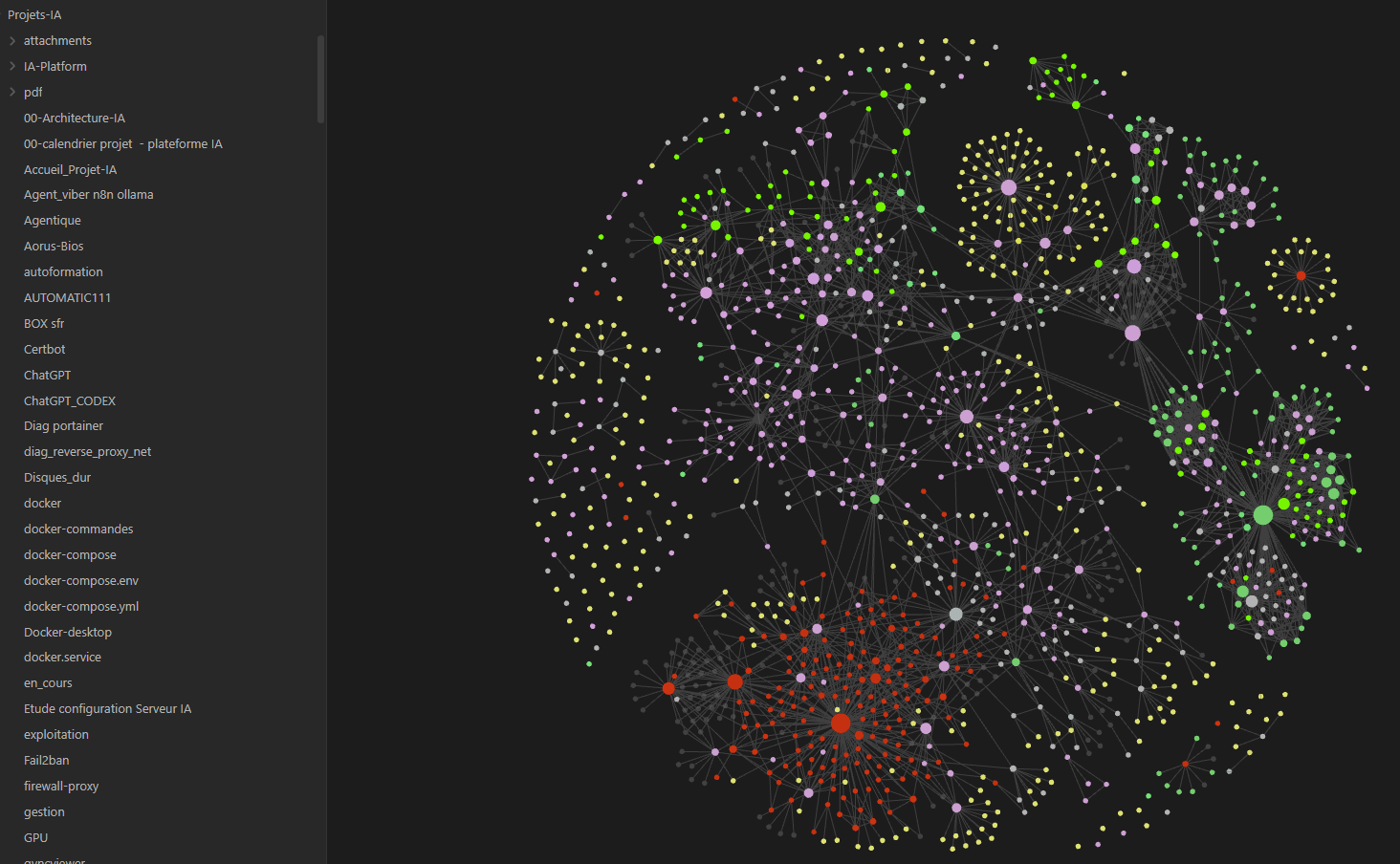
Every infrastructure component has its own dedicated note, linked via wikilinks. The Obsidian graph visualizes dependencies in real time: Proxmox → LLM VM → Docker → Ollama → Open WebUI.
📚 Technology watch base
Articles, model benchmarks, comparisons (LLaMA vs Mistral vs Phi), reading notes on RAG and Qdrant. All centralized, retrievable in 3 seconds via full-text search.
Obsidian's graph view visually connects notes: each dot is a note, each line a link. It reveals thematic clusters (infrastructure, AI, DevOps…) and the vault's central notes.
infra-vaultinfra-vault/
├── 00-inbox/ ← Notes brutes, à trier
│ └── 2026-06-16.md
├── 01-journal/ ← Une note par session de travail
│ ├── 2024-11-14-gpu-passthrough.md
│ └── 2025-03-08-rag-qdrant.md
├── 02-infrastructure/ ← Documentation technique
│ ├── proxmox.md
│ ├── zfs-storage.md
│ ├── gpu-passthrough.md
│ └── reseau.md
├── 03-ia/ ← IA & modèles
│ ├── llm-comparatifs.md
│ ├── ollama-setup.md
│ ├── rag-architecture.md
│ └── comfyui.md
├── 04-devops/ ← Outils & workflows
│ ├── docker-compose.md
│ ├── git-strategie.md
│ └── python-scripts.md
├── 05-veille/ ← Articles, benchmarks, liens
│ └── modeles-llm-2025.md
├── 06-portfolio/ ← Brouillons des pages web
│ └── obsidian-page.md ← (cette page est née ici)
└── templates/
├── session.md
└── tech-fiche.md02-infrastructure/ or 03-ia/ ends with a ## References section listing the URLs consulted — exactly like the pages of this portfolio.| Plugin | Concrete use |
|---|---|
| Dataview | Queries on notes — list of all open tasks |
| Templater | Session templates with auto date and contextual links |
| Calendar | Date-based navigation in the build journal |
| Git | Automatic vault commit every 30 min |
| Kanban | Tracking board for infra tasks in progress / done |
| Excalidraw | Architecture diagrams directly in the notes |
- Organizing a vault by domain (adapted PARA)
- Writing Dataview queries for dashboards
- Creating Templater templates with dynamic variables
- Automatic Git sync of the vault
- Link between the Obsidian vault and the portfolio GitHub repository
- Navigable knowledge graph (200+ linked notes)
- Using Obsidian Publish for selective sharing
Dataview lets you query the vault like a database. Example: display all in-progress infra tasks, sorted by last modification date.
```dataview
TABLE
  file.mtime AS "Dernière modif",
  status AS "Statut",
  tags AS "Tags"
FROM "02-infrastructure" OR "03-ia"
WHERE status = "en-cours"
SORT file.mtime DESC
```
This portfolio was not written from scratch. Each HTML page is the publishable version of an existing Obsidian note, enriched and formatted. The workflow is simple:
Raw note-taking during the build
Consolidation into 02-infrastructure/ or 03-ia/
Writing in 06-portfolio/
portfolio.stephanemuraro.fr
Key advantage: the Obsidian note remains the source of truth. If a config changes (Proxmox version, updated LLM model), the note is updated first, then the HTML page is synced.
This flow also keeps unpublished information in the vault (API keys, internal IP addresses, sensitive debug notes) with no risk of exposing it on GitHub.
The vault itself is versioned on a private GitHub repository, separate from the portfolio's public repository.
| Feature | Level | Notes |
|---|---|---|
| Daily Markdown note-taking | Advanced | Daily use since 2024 |
| Bidirectional links & graph | Advanced | 200+ interconnected notes |
| Templater — dynamic templates | Intermediate | Session templates and technical sheets |
| Dataview — queries | Intermediate | Dashboards, filtered lists |
| Automatic Git sync | Intermediate | Obsidian Git plugin — commit every 30 min |
| Excalidraw — embedded diagrams | Basic+ | Simple architecture diagrams |